Free fix for Elementor

NoviFix

Use your global color variables in Elementor background gradients. Free and open source.

Your color variables, right in the gradient

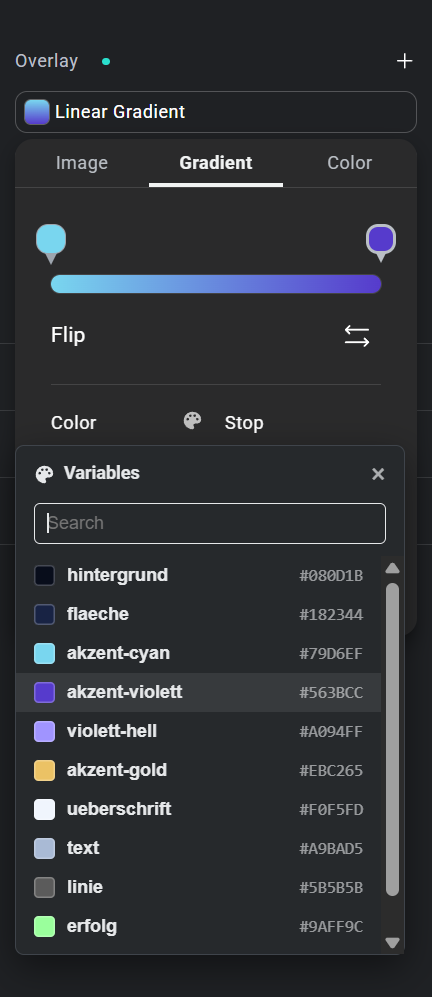
NoviFix variable list next to the color field of an Elementor background gradient

In the Elementor editor, every color field offers your global color variables. Except one: the color stops of a background gradient. There you only get the manual color picker, so you look up hex values again and again.

NoviFix adds the missing list.

  1. Open a background overlay and switch to Gradient.
  2. Click a color stop marker on the gradient bar.
  3. Click the palette icon next to Color.
  4. Pick a variable from the list, or search for it.

NoviFix does not change Elementor and loads nothing on your site’s frontend. It is a temporary fix: once Elementor supports variables in gradients, simply remove it.

Version 1.0.0 · Free · GPL-2.0 · Requires Elementor with Editor V4. Source code on GitHub.
NoviFix is not affiliated with or endorsed by Elementor.

Get notified about new fixes

We publish small, free fixes for Elementor from time to time. Leave your email and we tell you when a new one or an update is out.

Your download has started

Thanks for trying NoviFix. Install it under Plugins → Add New Plugin → Upload Plugin.

Want to know when new fixes and updates are out?